

SMS Notifications Setup PRO
⭐ Pro Feature
SMS Notifications are a premium feature. You’ll need to upgrade to the Pro plan to send text message reminders to your customers. SMS notifications greatly reduce no-shows and keep customers informed with convenient text updates. Click the Upgrade button in the sidebar menu to unlock SMS functionality!
Reduce No-Shows with SMS – Text message reminders are one of the most effective ways to ensure customers remember their appointments. SMS notifications have significantly higher open rates than email, making them an essential tool for busy businesses.
📍 Accessing SMS Settings
To configure SMS notifications, click on Settings in the left sidebar menu, then select the Notifications tab and scroll to the SMS sections.
1 Enable SMS Notifications
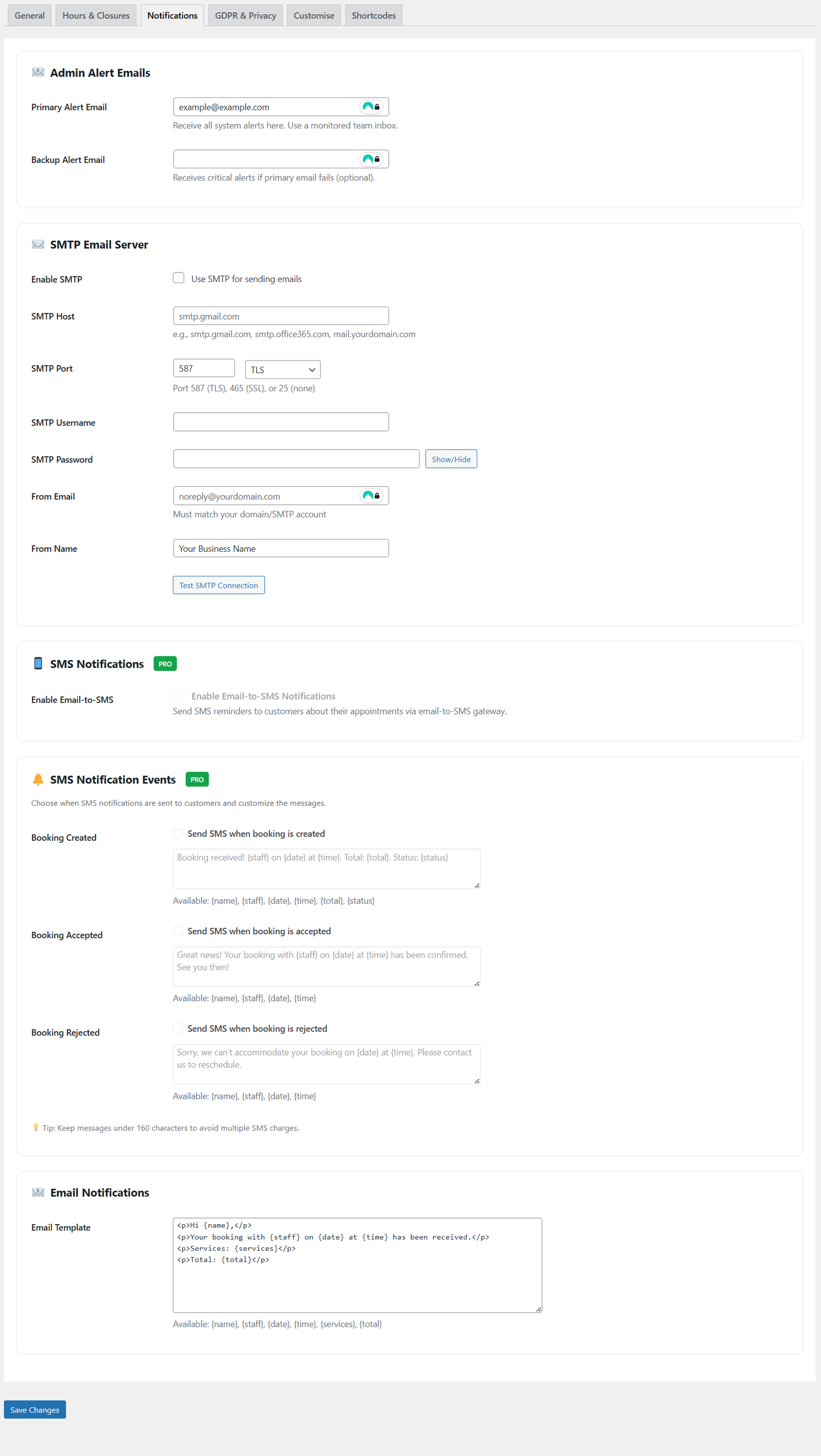
SMS notification configuration (Pro plan required)
SMS Configuration:
- Enable Email-to-SMS
Check this box to send SMS reminders to customers about their appointments via email-to-SMS gateway.
⚠️ SMS Provider Required
To use SMS notifications, you will need to choose an SMS provider that supports email-to-SMS functionality. Not all SMS providers offer this feature, so please verify before signing up.
We recommend Voodoo SMS – a reliable email-to-SMS provider. See our separate documentation article on how to set up Voodoo SMS with SinceCode Booking for detailed setup instructions.
📱 How Email-to-SMS Works
The system uses an email-to-SMS gateway service to convert email messages into text messages. This provides a reliable way to send SMS notifications without complex SMS API integration. Your SMS provider will give you a unique email address – when SinceCode Booking sends an email to that address, your provider converts it to an SMS and delivers it to the customer’s phone.
2 SMS Notification Events
Choose when SMS notifications are automatically sent to customers. You can customize the message for each event:
Booking Created
Send an SMS immediately when a customer creates a new booking.
- Purpose: Instant confirmation that their booking request was received
- When to use: Always recommended for immediate customer reassurance
Booking Accepted
Send an SMS when you manually accept a pending booking.
- Purpose: Notify customer their booking is confirmed
- When to use: Essential if you manually review bookings before accepting
Booking Rejected
Send an SMS when you reject a booking request.
- Purpose: Inform customer their requested time isn’t available
- When to use: Professional courtesy when declining bookings
💬 Character Limit
Keep messages under 160 characters to avoid multiple SMS charges. Be concise and include only the most important information.
3 Customizing SMS Messages
Each SMS notification event has a customizable message template. Use variables to personalize your messages:
Available Variables
{name}– Customer’s first name{staff}– Staff member’s name{date}– Booking date{time}– Booking time{total}– Total price{status}– Booking status
Example SMS Messages
Booking received! {staff} on {date} at {time}. Total: {total}. Status: {status}(134 characters)
Great news! Your booking with {staff} on {date} at {time} has been confirmed. See you then!(92 characters)
Sorry, we can't accommodate your booking on {date} at {time}. Please contact us to reschedule.(98 characters)
4 SMS Consent Management
Manage how customers opt-in to receive SMS notifications:
Require SMS Consent Checkbox
This setting is found in the GDPR & Privacy tab:
- When Enabled: Customers must explicitly check a box to opt-in to SMS notifications on the booking form
- When Disabled: SMS will be sent to all customers automatically (they’re opted-in by default)
⚠️ Legal Compliance
SMS marketing laws vary by country. In many regions, you must obtain explicit consent before sending marketing SMS. Consult with legal counsel to ensure compliance with local regulations like GDPR, TCPA, or CASL.
5 Benefits of SMS Notifications
- Higher Open Rates – SMS messages have 98% open rates compared to 20% for email
- Immediate Delivery – Texts are read within minutes of receipt
- Reduce No-Shows – Timely reminders dramatically decrease missed appointments
- Convenient for Customers – Quick, easy-to-read updates on their phones
- Improved Communication – Faster response times for booking confirmations
- Professional Image – Shows customers you value their time
⭐ Ready to Upgrade?
SMS notifications are available exclusively with the Pro plan. Upgrade today to:
- Send unlimited SMS notifications to customers
- Customize messages for different booking events
- Reduce no-shows and improve customer satisfaction
- Access all other Pro features including staff holidays, advanced shortcodes, and more
Click the Upgrade button in the sidebar to get started!
Best Practices for SMS
- Keep It Short – Stick to essential information, under 160 characters
- Be Clear – Include date, time, and any actions required
- Professional Tone – Friendly but concise messaging
- Test Messages – Send test SMS to verify formatting and delivery
- Monitor Delivery – Check that messages are being sent successfully
- Respect Preferences – Honor customer opt-out requests immediately